
There are always new ways to improve your IT proficiency and ability to be more efficient when working around IT. My “Quick Wins” weekly post will identify small changes you can make to your current practice to make your life that little bit easier. I will be suggesting some hints and tips in terms of what you can do to improve your practice.
Teams – Pin Feature
Use the Pin function to “PIN” feature to PIN your CHATS and CHANNELS in Microsoft Teams. This will help you arrange your CHATS and CHANNELS to help you find more relevant information faster.

Using the PIN feature will make that CHAT or CHANNEL appear attached to the top of their given panel, be it Teams Groups or Teams Chat.
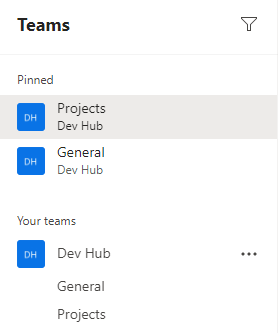
Being able to pin Channels and chat will make finding the most used chats and channels easier to find when you are involved in a large number of projects.
 Mr Bainbridge