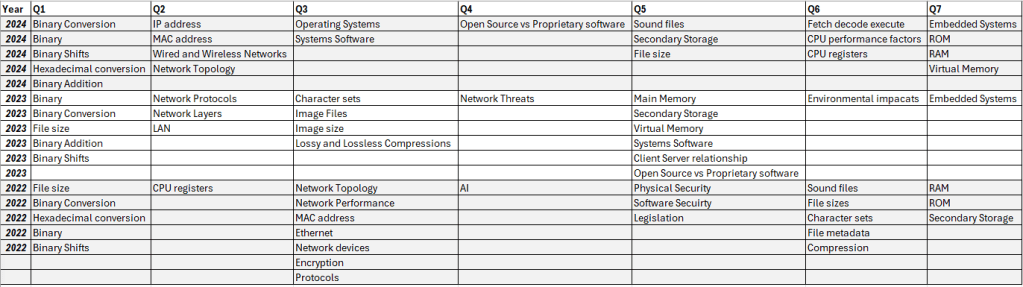
I have taken the time to review the previous exams released for J277/01 and J277/02 and shown the collection of content linked to different areas of the exam over the past 3 years.
Below you will find the collective grade boundaries for GCSE Computer Science courses. Grade Boundaries recorded in % of total marks. This represents the combined mark and percentage.
Yet again another rammed Microsoft Ignite show. There are so many innovations on the horizon in relation to Microsoft 365 that will revolutionise how we interact in the workplace and in the social space. We have taken the time to look through everything Ignite had to offer to bring you the Changing Social highlights, to tell you what we are excited to see soon.
In true Changing Social fashion, we are going to break these down into the following key areas for any business:
Collaboration and Communication
Automation
Wellbeing
Collaboration and Communication is key at the moment, with preparations underway to get some workers back in the office and for some to continue to work remotely, you need to ensure that your workforce and be productive through effective collaboration and communication. Workers should feel confident in being able to communicate with their colleagues and work on the same documents and projects with ease.
Keep it private – It was announced that the Teams platform will soon support end-to-end encryption on teams calls. This will help to support users in having that peace of mind that their conversation through teams remain private and confidential. This can have an impact on the personal and commercial world. Keeping your conversations and communication private is a must in any organisation, other platforms sell their products on the secure nature of their technology and that users can trust it.
Future proof it – Microsoft launched Microsoft Mesh a communication and collaboration platform to utilise mixed reality with colleagues to work on business outcomes. Using HoloLens users can share a mixed reality experience to support working together apart. Transport your colleagues into your workspace, virtually. There are many reasons why we like this product, the first being the convenience of having an instant meeting to discuss very intricate and technical projects with peers in your organisation. The second is the reduction on the on the need for travel, thus causing less impact to the environment. The use of virtual reality, augmented reality and mixed reality is on the rise, Microsoft Mesh could be a potential game changer for the workspace.
More ways to meet – The teams experience is now going to add a third meeting option. Currently through Teams you can create a Meeting or a live event, both has a specific use for smaller or larger audiences. Now Microsoft will introduce the webinar option as its third meeting type. Webinars will support up to 1000 attendees and have an auto scale model so if you go over 1000 people it will increase the limit to 10000. Webinars will support bespoke interaction with the audience and attendee reporting post webinar.
As we look to return to work and engage in the new normal, automation will play a role in maximising outputs in the workplace. Microsoft have continued their development of the Power platform and looked to put the power of automation in everyone’s hands with no code/ low code solutions.
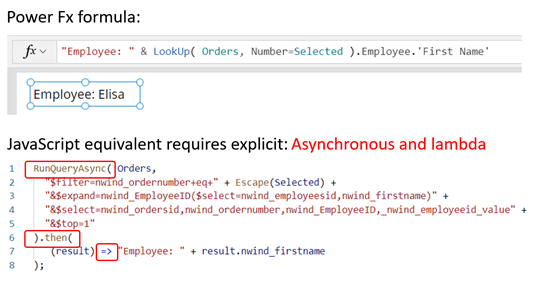
Let’s code – The Power platform took a big step forward with trying to empower all users to make solutions with the use of Power Fx. This is Microsoft’s first low code programming language to entice the masses to start building their custom solutions and utilising data within their organisation. Having the ability for anyone to pick up a programming language and start producing tangible results will play a massive role in the productivity to your organisation, coupled with the personal development and empowerment that employees will feel by making a difference.
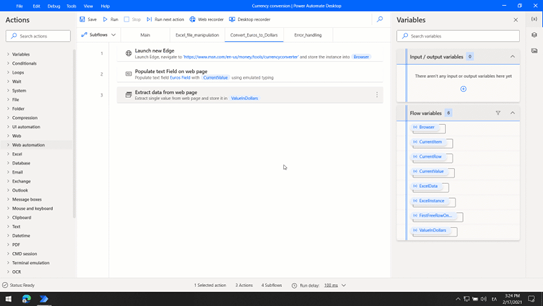
We don’t need to power it if it’s free – Microsoft announced that Power Automate desktop will be free to Windows 10 users at no additional cost, this is grant users access to the Power Platform and allow them to begin to automate the routine events. The new normal will allow for non-technical users to begin automating their day to focus on the human element of work and personal interaction. This can be the new Excel Macro of our era, being able to translate events in your workspace to code elements to help with repeated process will have a major impact on productivity within your organisation and a direct impact on your employees.
With the recent developments in vaccines the workplace is once again going to shift, some companies are looking to permanently allow staff to work from home, some companies will see a return the physical office space and some will adopt a hybrid approach to working; needless to say, work as we know it has changed and to support the wellbeing of your staff Microsoft has created Microsoft Viva.
The Viva suite breaks down into 4 different areas: Topics, Connections, Learning and Insights. All are aimed at supporting your employees in the workplace to manage their digital usage, social interactions, and personal development.
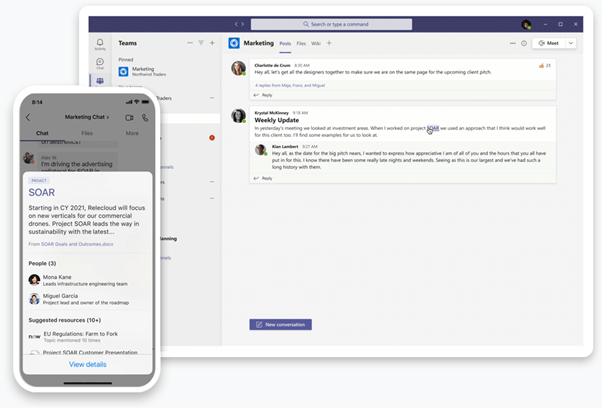
In the know – Viva Topics will analyse the daily usage of apps within the Microsoft 365 product suite and look to provide as much product content from across your organisation to reduce the amount of time your employees spend looking for information and content. This personal assistant tool will help to focus the attention of the user and help maximise their productivity and mood.
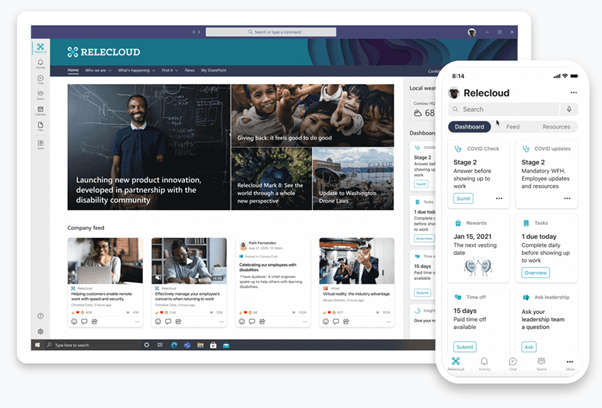
Stay connected – Viva Connections will look to keep your employees connected by analysing relevant conversations streams and news within your organisation to ensure that employees are keep in the loop. This is especially important as we look to adopt new in office/home/hybrid working pattern policies.
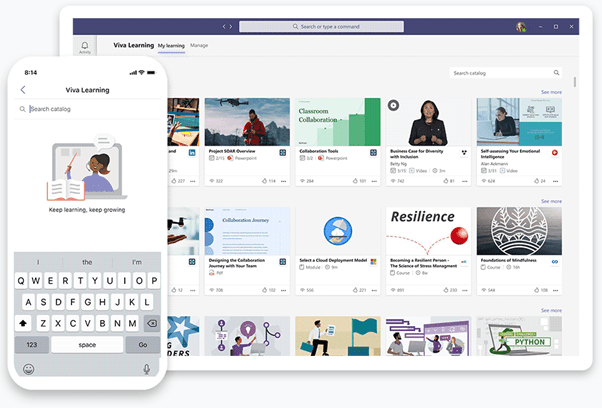
Growth mindset – Viva Learning helps to bring the power of continuous professional development into the workplace. You company is only as strong as those you employee, being able to provide formal and information training directly to any device is a massive benefit for your organisation; allowing your employees to personalise where and how training takes place empowers and encourages those to achieve more.
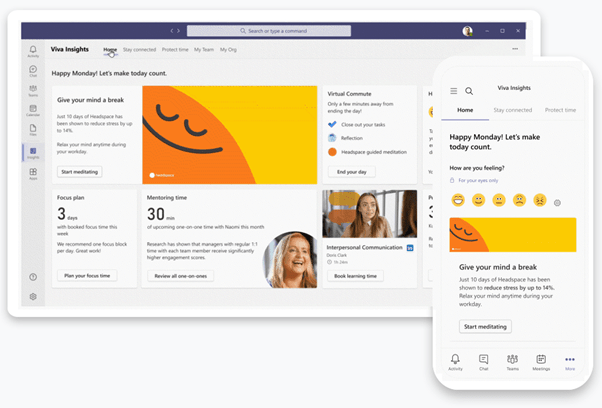
Let’s get personal – Viva insights deep dives into the relationships you have with others inside your organisation. It also allows you to provide granular access to the time you have spent on different aspects of your work. Personalise the reports you receive to identify the information that is important to you on how you perform your role. Identify trends and patterns within your organisation to compare the average usage and working patterns of others. Look after the wellbeing of every individual.
These are just a few of the highlights from the Microsoft Ignite event, if you want to discover more please visit:
Of course no Microsoft Ignite would be complete without the chance to earn your free certification from Microsoft. Complete the Cloud skills challenge before the 30th March 2021 to earn a voucher for certification to use on Microsoft learn:
It’s been another interesting set of Ignite sessions from Microsoft. Seeing how the different products available to partners and clients have changed considering the COVID pandemic and how people are using technology to deal with the NEW NORMAL.
Ignite offered a range of updates on products and services and some great success stories about how products and services have helped during the pandemic and inspired stakeholders to change their standard ways of working.
For me there were some very interesting updates inbound for all users. Some of the highlights are listed below:
Virtual Commute
Microsoft Virtual Commute App
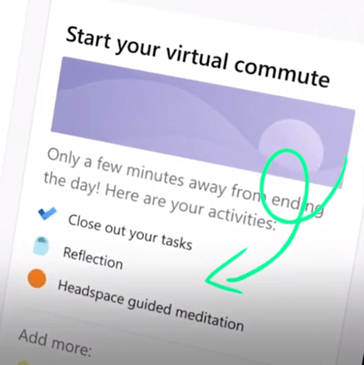
Bringing a new feature to teams to support remote workers and their mental health and potential adjustment back to the physical world of work. Virtual Commute allows employees to set aside time to review their work and gather their thoughts in a central space without being disrupted. As we have now entered a pro-longed period of remote work the transition back to the commute may be difficult for some. Virtual commute will help employees gather their thoughts and place in time for reflection.
Native Learning App
Microsoft Native Learning App
Microsoft has identified the need for constant upskill of everyone around the world to meet the demands of a digital landscape in the office. To support users of Teams they are developing a native learning app that will be installed alongside other native apps. This will bring learning content from LinkedIn learning and Microsoft Learning Pathways into a single space to enable your employees to grab some time to continue their professional development.
Both of these have been designed to enable Teams to be that essential communication, collaboration and productivity platform that employees will need. These will support all types of employees and aid with productivity on the go as well as in the office.
There were many more developments during Ignite, these happened to be my favourites.
Don’t forget there is still time to check out and sign up for the Ignite Cloud Skills Challenge for a chance at a prize and free certification.
I had the opportunity to attend (digitally of course) MS Inspire this year. This was my first year of attending, I discovered some interesting findings from the sessions I attended. During the event, I had planned to attend sessions that focused on the following: Education, Accessibility and Power Platform. These are areas of natural interest given my current role and previous experience.
I feel that these topics are linked given the current situation with COVID-19, the realm of remote working remote/ blended learning across the education sector.
Education
Microsoft have made major strides in tailoring their products and offerings for the education sector. It was impressive to see how the education professionals from around the world have rapidly deployed and adopted the use of Microsoft Teams. There were several showcases detailing how the use of Teams as a central hub had been used for welfare, teaching and assessment collaboration.
The focus for education was never aimed at the technology, but instead the individuals who were using it. This included teachers, students and their parents. During the COVID-19 period, the level of remote interaction has increased exponentially. The responsibility of education has not only fallen to the traditional relationship between student and teacher, but has served to strengthen the involvement of parents in the education process.
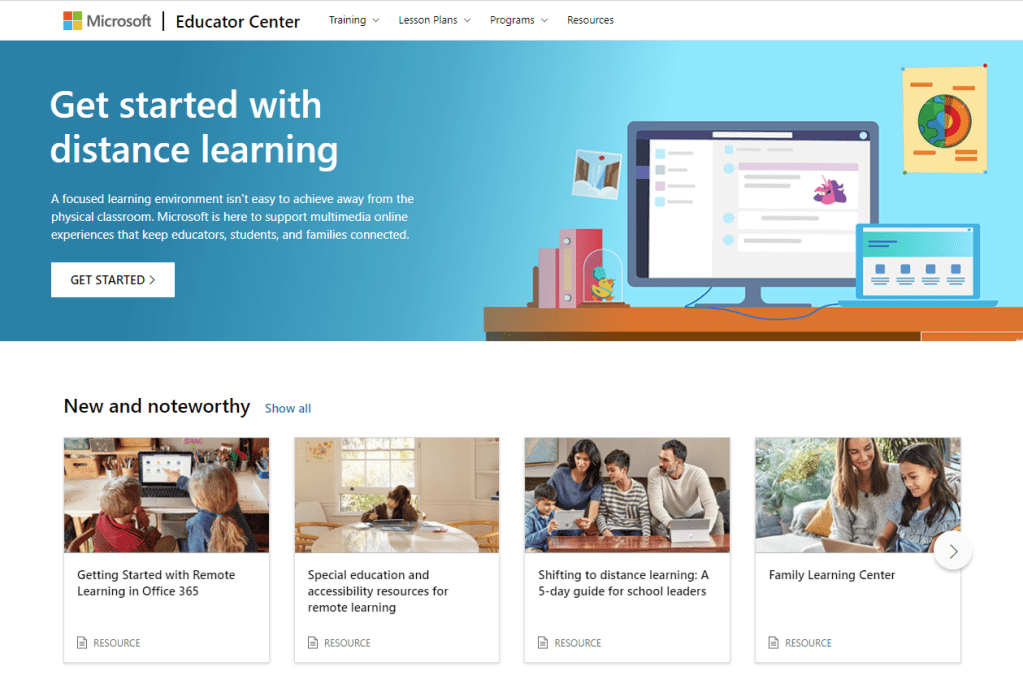
Its evident just from looking at the Microsoft Education Center (MEC) that Microsoft are trying to support families and schools through this difficult time by creating resources to train and educate adults on how to support students at home.
Microsoft Education Center July 2020 – Supportive material for families
Credit has to go to the teams behind the MEC for rapidly developing and deploying supportive material for educators and families.
Accessibility
As always the focus for accessibility was people centred, looking at how the implementation of technology has improved the life experiences for all. There were showcase experiences from Phoenix Software and Software One on how they were beginning their journeys into a more accessible workplace for all. The message portrayed quite rightly is that there is no quick fix for such a complex issue. Through a process of self-reflection, research and education, both organisations were able to raise awareness surrounding accessibility in the workplace.
Accessibility is a key area for Microsoft, this was reiterated in Satya Nadella’s keynote about the priorities for Microsoft moving into the “new normal”, an inclusive approach to making a better world for everyone including the 1 billion people across the planet with disabilities.
Accessibility fundamentals
Microsoft Accessibility Fundamentals Learning Pathway
The Accessibility Fundamentals Learning Pathway is the first external accessibility learning module provided by Microsoft. This sits on the Microsoft Learn platform which enables you to boost your knowledge of Microsoft products and earn certification from your learning. The learning path consists of 4 modules:
1. Introduction to disability and accessibility 2. Microsoft accessibility features and tools 3. Creating accessible content with Microsoft 365 4. Digital accessibility
I have completed this learning pathway and found the modules to be insightful and provide a good rounded overview of accessibility & inclusion. It also highlights what Microsoft have provided in terms of tools and mindset towards helping others.
Power Platform
From my perspective there was a large emphasis placed on the Power Platform during Microsoft Inspire 2020. Trying to prepare employees, employers and everyone for a post COVID world will be challenging. The message provided in the sessions that I attended was that the Power The message from the sessions I attended was Power Platform can be used to support people by making their work easy to manage and maintain by promoting the optimisation of workflows and the automation of tasks. Of course Power Platform is capable of more than this, but my understanding of the sessions I attended was that 2021 is the time to raise awareness of the features and capabilities held within Power Platform to enable everyone to benefit from its use.
Microsoft Power Platform – Utilising automation and data
The need to up skill your work force was made clear but only to a certain extent. The structure of Power Automate and Power Apps has taken a no code/ low code approach. This will enable those without programming skills to leverage this technology with relatively little or no prior knowledge on programming or app development. During one of the keynotes from Satya Nadella he was quoted as saying: “you can start with just a list“. He was referring to the process by which anyone can create a bespoke solution using Power Platform to engage with an organisation to improve efficiency and productivity.
Final Thoughts
There is an inherent link between all of the above. Teachers have always found their time swamped with manual processes, an over abundance of marking with sometimes questionable links to outcomes or the improvement of life opportunities. Is this an opportunity to find a new way to increase the quality of teaching and learning via the use of automation within school processes?
The opportunity presents itself to invest in teachers to make them more digitally confident to tackle blended and remote learning in the short and medium term. Using accessibility tools and educating learner’s on how they can use accessibility tools to produce and access content both inside and outside the classroom, ensuring equal access to materials and opportunities to learn. Working towards a state where technology is fully utilised within schools to maximise teaching and learning and using data to help identify patterns and trends using Power Bi, allowing Heads of Department to dissect datasets at will to make informed, meaningful decisions has to be the new normal for ALL schools.
As a Teacher or educational practitioner using teams is a must during the COVID pandemic. But do you really know who is engaging from your classes in your Teams resources and channels. Using the Insights app from Microsoft you can get an engagement report which outlines which students have engaged with your channel content. This is an invaluable tool when it comes to safeguarding.
There are two new additions to Insights. The first addition is being able to have oversight of all your classes by adding the Insights app to the app rail as oppose to a single Team as a Tab. This provides ease of access to data to analyse class interactions.
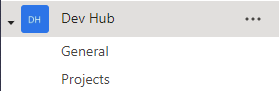
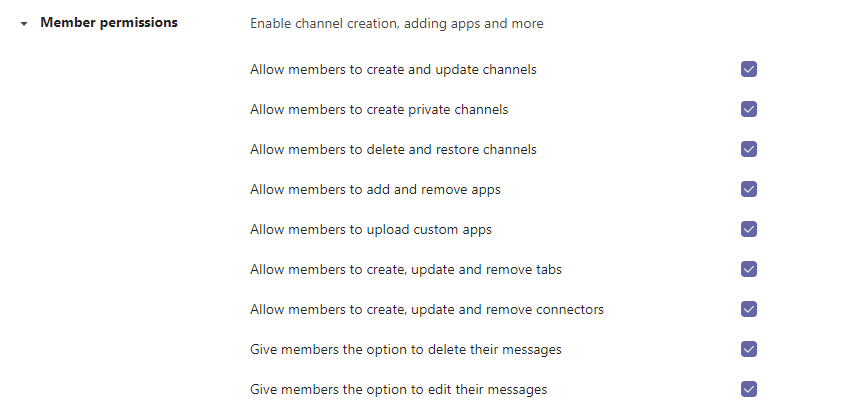
As a Teacher or Educational Practitioner you should be focused on how, where and when your students engage with yourself and others. It is important to make sure that all communication and collaboration is meaningful and takes place in the correct place. Control the setting for your groups and the level of interaction in Manage Team option, from here you can set the permissions for Members (your students) of the group.
Teams Groups settings
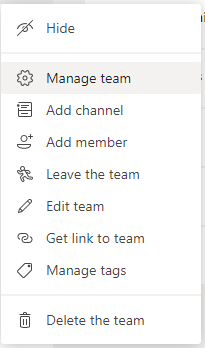
Gain access by CLICKING on the MORE ACTIONS (three dots) menu.
From here you can select MANAGE TEAM from the drop down menu.
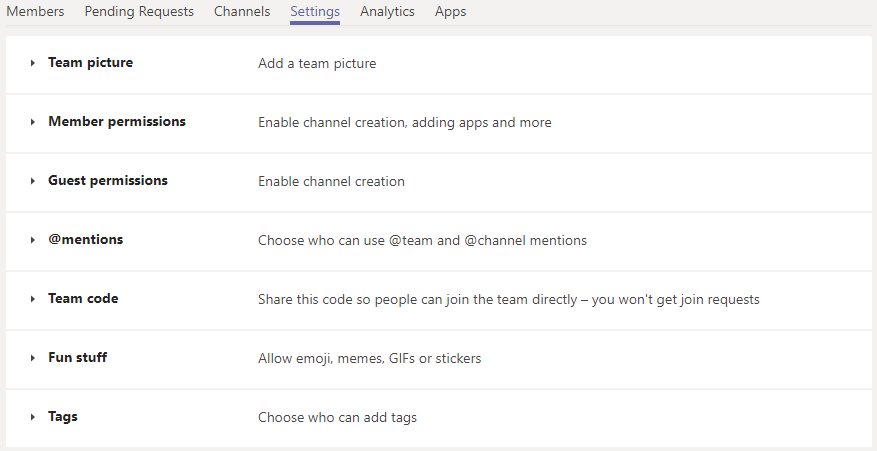
From the series of TABS that appear, select the SETTINGS TAB.
From here you can ENABLE or DISABLE the abilities of your MEMBERS. This can help provide a greater sense of control in your Student Groups.
Having access to this level of control will help guide more meaningful interaction and help to safeguard students within your school/ educational establishment.
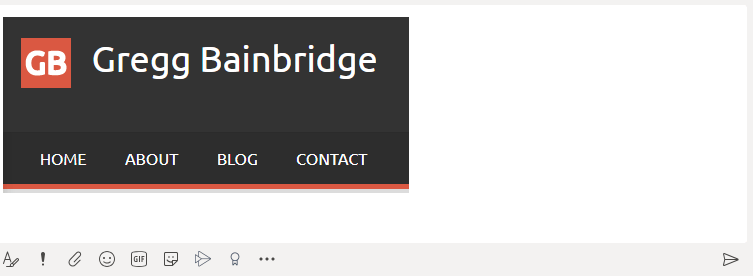
When you are trying to explain to your colleagues about specific elements of a problem with code or area of interest on screen, you can quickly show them using “Snip & Sketch” tool to capture specific areas of your screen and paste them in your Teams chat/ document or other location to share with others.
Windows 10 – Snip & Sketch
During a meeting or chat activate Snip & Sketch by pressing WIN + SHIFT + S, You can then draw around your selected area of the screen to share with your colleagues.
You can use CTRL + V to paste your new image to most applications or use the paste option from most right-click menus.
Being able to quickly share elements your screen will help anyone you are communicating with understand potentially complex technical situations. Remember a picture is worth a thousand words, get to the heart of your problem fast by showing what the problem is.
There are always new ways to improve your IT proficiency and ability to be more efficient when working around IT. My “Quick Wins” weekly post will identify small changes you can make to your current practice to make your life that little bit easier. I will be suggesting some hints and tips in terms of what you can do to improve your practice.
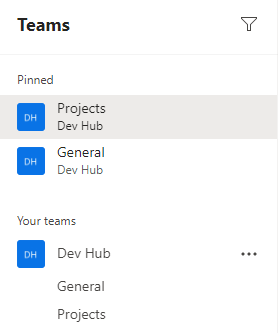
Teams – Pin Feature
Use the Pin function to “PIN” feature to PIN your CHATS and CHANNELS in Microsoft Teams. This will help you arrange your CHATS and CHANNELS to help you find more relevant information faster.
Using the PIN feature will make that CHAT or CHANNEL appear attached to the top of their given panel, be it Teams Groups or Teams Chat.
Being able to pin Channels and chat will make finding the most used chats and channels easier to find when you are involved in a large number of projects.









 Mr Bainbridge